Technology and the Media
When used effectively, technology can be a fantastic tool for MFL teachers.
Audacity is a free sound recording and editing piece of software, which you can download here. We recommend that you ask your IT technician to install it across the school network. Coupled with headsets and microphones for each pupil (which can be bought very cheaply as sites such as www.cpc.farnell.com search for headphones with a microphone for £2.95 for one or £2.66 for 25 or more) you can transform an ordinary computer suite into a multimedia lab.
Pupils can record raps or songs they have created. Very usefully, they can edit them to cut out unwanted noise, play backing tracks and sing to accompany them, and even change the pitch and speed of what they have recorded.
Teachers can pre-record speaking questions in audacity, generate silence and save it as an audacity project. Pupils can open it up, save their answers, and export the finished version as an .mp3 or .wav file. For more information and Wendy Adeniji’s training courses showing you how to do this, go to www.trainingforlearning.co.uk.
Vokis are a free and fun way of using previously recorded sound (ideally using audacity and then edited) to create a personal avatar which speaks. It is easy to use and self explanatory, and pupils can create avatars, save them and put them up on a website. Go to www.voki.com and register for free.
Sam:
Get a Voki now!
Kirsty:
Get a Voki now!
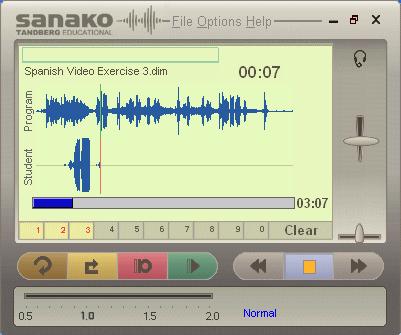
Media Assistant SOLO is a dedicated languages media player and voice recorder solution and can be downloaded from here (for a 30 day evaluation). You can purchase an individual license for £49+VAT or a classroom license for up to 30 positions for £495+VAT. For contact details of where to buy please refer to the manufacturers web pages at www.sanako.co.uk
Pupils and teachers can record their voice, listen to existing audio and video clips, add text subtitles, add instructions, record their voice along with an existing audio and video clip (karaoke type operation), insert their voice into existing recordings (for as long or as short as they want), insert bookmarks for instant access to that part of the material, add image attachments to appear automatically during playback, vary the playback speed of the audio material, digitise audio direct from the internet such as radio broadcasts, digitise tape cassettes, view all audio as a voice graph. All standard formats are supported such as MP3, WMA, MP4, WMA etc.... and the software can be installed on to any PC running Windows XP, VISTA or Windows 7. The solution is very powerful but very easy to use.
It can be used for oral examinations (both on the day of the exam and in preparation), marking student work by inserting teacher comments directly into student recordings, creating student multimedia presentations and for the following type of general language learning exercises – listen and repeat, question and answer, simultaneous translation and consecutive translation. To read more about how SOLO can be used for examinations please click here and watch this video. For details on how you can create subtitles and bookmark exercises please click here.